

Backlink Audit: How to Find the Links Helping or Hurting Your SEO
You can have thousands of backlinks and still have a weak backlink profile.
A backlink report might show an impressive number of links, but that number alone doesn’t tell me much. I want to know where those links come from, why those websites are linking, which pages are receiving them, what has been lost, and whether anything actually needs attention.
That is what makes a backlink audit useful.
A proper audit isn’t about opening an SEO tool, sorting links by a toxicity score, and deleting everything that looks suspicious. It’s about understanding the profile behind the numbers and turning that information into better SEO decisions.
In this guide, I’ll show you the process I would use to audit a backlink profile — including what to check, how to evaluate referring domains, how to analyze anchor text, how to find valuable and lost links, and how to decide what actually deserves action.
What Is a Backlink Audit?
A backlink audit is a structured review of the websites and pages linking to your site.
But simply exporting a backlink report isn’t an audit.
The useful part starts when you begin asking questions about the data:
- Which websites are linking to us?
- Are those websites relevant to our industry?
- Which referring domains are genuinely valuable?
- Which pages are attracting the most links?
- Are important pages receiving enough external links?
- Have we lost any valuable backlinks?
- Are there unusual anchor-text patterns?
- Are there suspicious link patterns worth investigating?
- What can our existing backlink profile teach us about future link building?
For example, imagine a SaaS website has 4,000 backlinks from 80 referring domains.
That sounds strong until you discover that 2,500 of those links come from just six domains.
Now compare that with another website that has 1,500 backlinks from 400 relevant referring domains.
The raw backlink count makes the first website look stronger. The underlying profile tells a much more interesting story.
That’s why I prefer looking at the structure of a backlink profile, not just the total number of links.
Why I Recommend Auditing a Backlink Profile
A backlink audit should lead to a decision.
You’re not collecting backlink data just to create another spreadsheet. You’re trying to understand what is happening and what should happen next.
Here are the areas I would focus on.
Find valuable backlinks
Some backlinks are worth protecting because they come from relevant websites, useful resources, industry publications, or pages that can send qualified referral traffic.
If one of those links suddenly disappears, you may have a legitimate recovery opportunity.
This is also where it helps to understand how to evaluate backlinks instead of judging them by a single authority metric.
Understand your referring-domain profile
A site can have thousands of backlinks but surprisingly few websites linking to it.
That’s why I usually look at referring domains alongside total backlinks.
The question isn’t simply:
How many links do we have?
It’s:
How many relevant websites have chosen to link to us, and what does that tell us?
Find lost backlinks
A lost link from an irrelevant directory probably won’t deserve much attention.
A lost link from a relevant industry publication is different.
That’s why monitoring new and lost backlinks should be part of an ongoing SEO process, not something you only check during an annual audit.
Understand unusual patterns
A sudden increase in exact-match anchors, a large number of links appearing from unrelated websites, or hundreds of links coming from a single domain can all be reasons to investigate.
But investigation doesn’t automatically mean removal.
That distinction matters.
Improve future link building
Your backlink profile can tell you what types of content and outreach actually attract links.
If your strongest links repeatedly point to original research, detailed guides, or specific resources, that’s useful information for your next content and link-building campaign.
What Should You Check in a Backlink Audit?
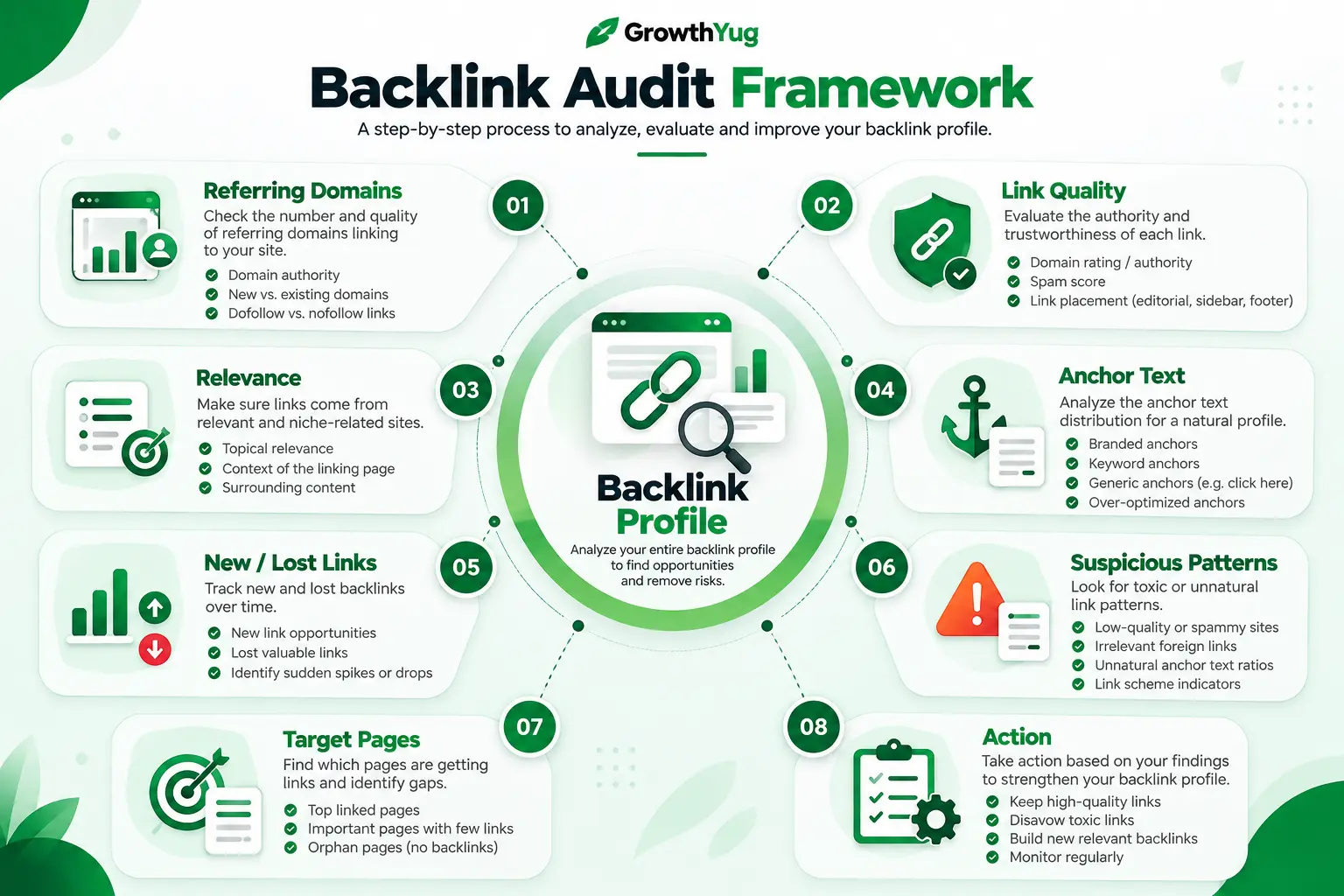
Before opening a spreadsheet containing thousands of rows, define what you’re actually trying to understand.
At a minimum, review:
- Referring domains
- Backlink URLs
- Target URLs
- Topical relevance
- Link placement
- Anchor text
- Link attributes
- New backlinks
- Lost backlinks
- Suspicious patterns
- Broken destination pages
- Pages receiving the most valuable links
- Referral traffic where available
- Link-building opportunities
One important rule:
Don’t judge a backlink from one metric.
A website with a high authority score can still be completely irrelevant to your audience.
A smaller website can have a highly relevant audience and send meaningful referral traffic.
A nofollow link can still be useful to people.
A low third-party authority metric doesn’t automatically make a website worthless.
Context matters.
How to Perform a Backlink Audit Step by Step
Step 1: Collect Your Backlink Data
Start by collecting the data you need.
Google Search Console gives you a first-party view of links Google has discovered, while tools such as Ahrefs, Semrush, and Moz maintain their own backlink indexes.
I wouldn’t assume that one database contains every backlink on the web. Different tools crawl different parts of the web and can therefore show different results.
For a practical audit, I would collect fields such as:
- Source URL
- Referring domain
- Target URL
- Anchor text
- Link attribute
- First-seen date
- Lost date, if available
- Relevant authority or traffic metrics
- Notes
If you’re dealing with a large profile, make the data sortable and filterable before starting the manual review.
It will save a lot of time later.
Step 2: Review Referring Domains Before Counting Backlinks
This is one of the first things I look at.
Suppose your report shows:
3,500 backlinks → 70 referring domains
That immediately makes me want to know where those links are concentrated.
Maybe one domain contributes 1,000 links. Another contributes 700. Several others contribute hundreds.
That changes how I interpret the 3,500-link number.
Now compare:
1,500 backlinks → 400 referring domains
The second profile may provide a much broader set of linking relationships.
This doesn’t mean the second profile automatically has better SEO value.
It means the backlink count alone isn’t enough information to make that judgment.
Look at:
- Top referring domains
- Number of backlinks per domain
- Domain relevance
- Page relevance
- Organic visibility
- Editorial context
- Sitewide patterns
- Repeated links from the same sections
If you need to understand the underlying data source more clearly, start with a backlink database before making conclusions from the numbers.
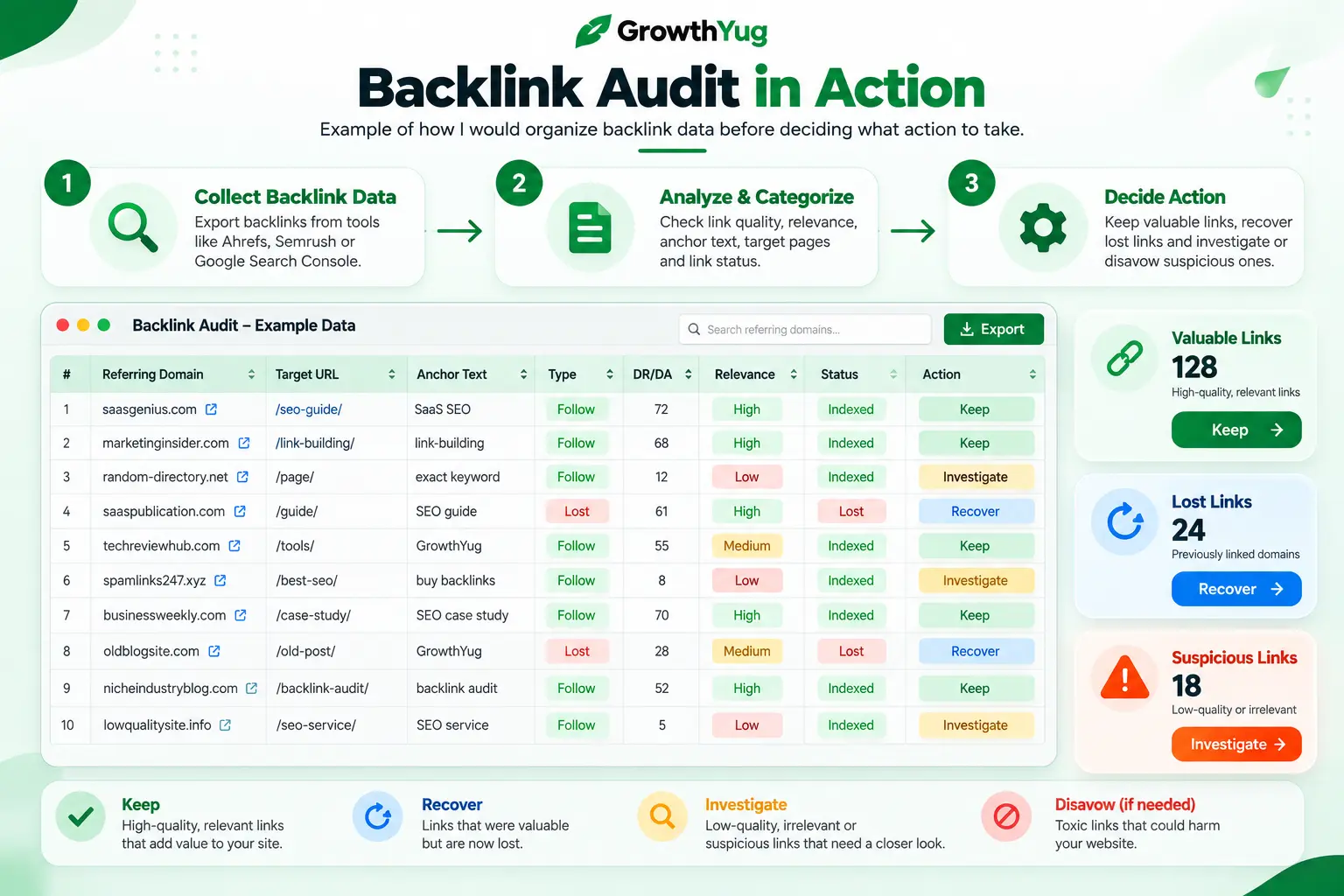
Step 3: Identify Your Most Valuable Backlinks
Not every backlink deserves equal attention.
I usually look at several signals together.
Relevance
Does the linking website or page have a meaningful relationship with your topic?
A link from a SaaS publication to a SaaS SEO resource makes intuitive sense.
A link from a completely unrelated website requires more context before you can judge its usefulness.
Context
Where does the link appear?
Open the actual page.
Look at the surrounding paragraph, heading, article topic, and reason the link appears there.
A backlink should make sense to a human reader, not just exist inside an SEO tool.
Destination
Where does the link point?
This is easy to overlook.
If the homepage has hundreds of useful referring domains but an important product or resource page has almost none, your audit may reveal a link acquisition opportunity.
Referral potential
Could the link actually put your website in front of relevant people?
That matters.
SEO isn’t only about third-party metrics. A relevant visitor who discovers your website through a useful editorial link can be valuable regardless of how impressive the linking domain’s metric looks.
Editorial reason
Ask yourself:
Why did this website link to this page?
Maybe the page contains original research.
Maybe it answers a difficult question.
Maybe it provides a useful template.
Maybe the author referenced it as a resource.
The answer can reveal what your audience considers link-worthy.
Step 4: Check Relevance and Link Context
This is where I don’t rely entirely on automated metrics.
Open the page.
Read the section where the link appears.
Then ask:
- Does the link make sense?
- Is the page relevant?
- Is the surrounding content legitimate?
- Does the anchor describe the destination?
- Does the link look editorial?
- Would a reader find the link useful?
Consider two examples.
Example A
A SaaS marketing website publishes an article about organic growth and links to your detailed SaaS SEO guide.
The relationship is obvious.
Example B
A website about kitchen equipment suddenly links to a SaaS SEO article using an exact commercial keyword.
That doesn’t automatically make the link harmful.
But I would investigate why the link exists and how it was acquired.
The goal of the audit is to understand the pattern, not panic over individual URLs.
Step 5: Analyze Anchor Text
Anchor text can reveal useful patterns in a backlink profile.
I usually group anchors into categories such as:
| Anchor type | Example |
|---|---|
| Branded | GrowthYug |
| URL | growthyug.com |
| Generic | click here |
| Topical | SaaS SEO guide |
| Partial match | SaaS link building strategy |
| Exact match | best SaaS link building |
Then look at the profile as a whole.
If most backlinks naturally mention the brand, company name, URL, or descriptive phrases, that gives you useful context.
If you suddenly see a large group of links using the same commercial keyword, investigate where they came from.
I would not apply an arbitrary “safe anchor text percentage” to every website.
There is no universal ratio that guarantees a natural backlink profile.
The acquisition pattern, context, relevance, and intent matter more than hitting a magic number.
Step 6: Find New and Lost Backlinks
A backlink audit shouldn’t only describe what exists today.
You also want to understand what changed.
Separate the data into:
New backlinks
and
Lost backlinks
Then prioritize the important changes.
For example:
Lost random directory link
Probably low priority.
Lost link from a relevant industry publication
Worth investigating.
I would check:
- Is the source page still live?
- Did the destination URL change?
- Was the article updated?
- Was the link intentionally removed?
- Is there a relevant replacement page?
- Can the relationship be naturally rebuilt?
A lost backlink isn’t automatically a problem.
But a valuable lost backlink can be an opportunity that is much easier to recover than earning an entirely new link.
Step 7: Investigate Suspicious Backlinks
This is where backlink audits often become overly aggressive.
Someone exports thousands of backlinks, sorts them by a third-party toxicity score, and starts treating every red result as dangerous.
I wouldn’t do that.
A tool can help you identify URLs worth investigating. It shouldn’t replace the investigation.
Look for patterns such as:
- obvious link networks
- paid links intended to manipulate rankings
- automated link placements
- large groups of unrelated websites
- keyword-heavy links with little editorial justification
- sitewide links that appear unnatural
- pages created primarily to host links
Google’s spam policies specifically cover link schemes designed to manipulate rankings, including certain paid links, excessive link exchanges, automated link creation, and other manipulative practices.
So the question isn’t:
“Does this backlink have a bad score?”
The better question is:
“Why does this link exist, and does the overall pattern suggest manipulation?”
Step 8: Don’t Automatically Disavow Every Bad-Looking Link
This deserves special attention.
A low-quality-looking backlink isn’t automatically something you should disavow.
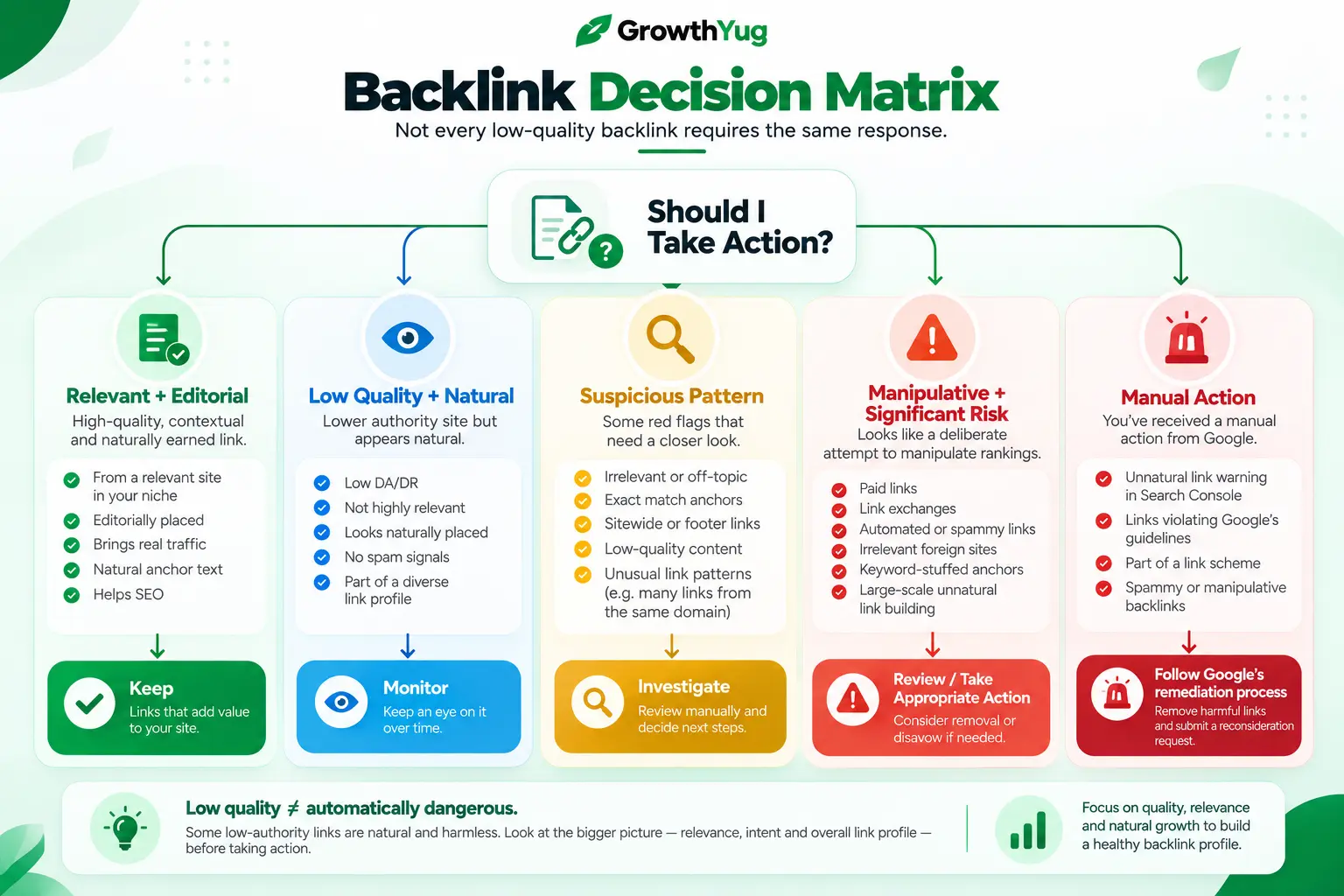
Google’s current guidance says most sites do not need the disavow tool because Google can generally assess which links to trust. Google recommends considering disavowal when there is a considerable number of spammy, artificial, or low-quality links and those links have caused, or are likely to cause, a manual action. Google also warns that incorrect use of the tool can negatively affect search performance.
So I would approach the decision like this:
| Situation | What I’d do |
|---|---|
| Random low-quality link I didn’t create | Usually monitor |
| Irrelevant link acquired naturally | Don’t panic |
| Valuable editorial backlink | Protect it |
| Suspicious pattern | Investigate |
| Deliberately created manipulative links | Review carefully |
| Manual action involving unnatural links | Follow Google’s remediation process |
| Large artificial link profile | Consider disavow only after proper review |
The important distinction is:
Low quality does not automatically mean dangerous.
Step 9: Check Which Pages Are Receiving Links
Now move from the domain level to the page level.
Create a simple view like:
Target URL → Referring domains → Valuable backlinks → Lost backlinks
This can reveal problems that a domain-level report hides.
Imagine your homepage has 300 referring domains while your most important product page has only eight.
Your problem may not be:
“We need more backlinks.”
It might be:
“We need better links pointing to the pages that matter.”
That’s a completely different strategy.
Also look for pages that naturally attract links.
If one resource has earned significantly more referring domains than similar pages, investigate why.
Maybe it contains:
- original research
- statistics
- a useful checklist
- a template
- a unique process
- an interesting opinion
- an unusually comprehensive resource
Your backlink audit can therefore become a content strategy tool.
Step 10: Turn the Audit Into a Link-Building Plan
This is where the audit should ultimately lead.
Don’t finish the project with:
“Here is a spreadsheet containing 5,000 backlinks.”
Turn the findings into four buckets.
Protect
Strong, relevant links that are worth maintaining.
Recover
Valuable links that have been lost and may be recoverable.
Investigate
Links or patterns that need a manual review.
Learn
Patterns that reveal what type of content, topic, relationship, or outreach is actually earning links.
That final category is often overlooked.
Suppose your strongest backlinks repeatedly point to original research.
That’s not only a backlink finding.
It’s a content strategy insight.
Or suppose most of your strongest links came from expert contributions.
That could influence your future outreach strategy.
The audit becomes useful when it changes what you do next.
Backlink Audit Checklist
Use this as a practical working checklist when reviewing a backlink profile.
Link-level review
Domain-level review
Strategic review
Risk review
Which Tools Can You Use for a Backlink Audit?
You don’t need to use every SEO tool available.
The important thing is knowing what each one contributes.
Google Search Console
Useful for Google’s own view of links it has discovered and for understanding the broader organic performance context.
Ahrefs
Useful for backlink discovery, referring-domain analysis, anchor text, historical changes, lost links, and competitor research.
Semrush
Useful for backlink analysis, historical data, competitive comparisons, and additional link-profile signals.
Moz
Useful for backlink discovery and additional authority and link metrics.
The goal isn’t to collect the biggest number of metrics.
It’s to make a better decision from the data.
If your primary need is ongoing monitoring rather than a one-time audit, GrowthYug’s guide to backlink monitoring tools goes deeper into that side of the process.
How Often Should You Audit Your Backlinks?
There isn’t one schedule that makes sense for every website.
A SaaS company running an active link-building campaign has different monitoring needs from a small site that rarely acquires backlinks.
I would pay particular attention after:
- launching a major link-building campaign
- changing SEO agencies
- acquiring a domain
- experiencing an unexplained organic traffic change
- migrating a website
- discovering a suspicious link pattern
- losing several important backlinks
- receiving a relevant Google Manual Action
For normal SEO maintenance, consistency matters more than choosing an arbitrary monthly or quarterly schedule.
You want a repeatable process that lets you notice meaningful changes before they become difficult to understand.
What a Good Backlink Audit Should Tell You
At the end of the audit, you should be able to answer five questions.
1. Where are our strongest links coming from?
Not simply which domains have the highest authority metric, but which sources are genuinely useful and relevant.
2. Which pages attract links?
This tells you what content is naturally earning attention.
3. What has changed?
Look at new links, lost links, changing anchor patterns, and changes in referring domains.
4. Is anything actually worth acting on?
Not every unusual backlink requires intervention.
5. What should we do next?
This is the most important question.
If your audit doesn’t lead to a decision, you’ve probably collected too much data and analyzed too little.
Final Takeaway
A backlink audit isn’t a contest to see who has the biggest backlink number.
It’s a way to understand the structure behind your backlink profile.
You want to know which relationships are valuable, which pages are earning attention, where links are disappearing, what patterns are emerging, and whether anything actually requires intervention.
And there’s one principle I would keep throughout the entire process:
Don’t audit backlinks just to find bad links. Audit them to understand what your SEO is actually doing.
That shift turns a backlink audit from a cleanup exercise into a source of strategy.
You might discover that a page you barely considered is attracting links from exactly the kind of websites you want. You might find a valuable backlink that disappeared last month. You might discover that hundreds of backlinks are coming from surprisingly few domains. Or you might find that a particular type of content consistently earns your strongest links.
Those are the findings worth acting on.
Once the audit is complete, keep the useful parts of the process running. Monitor new and lost backlinks, evaluate the quality of important links, and use what you learn to guide your next link-building campaign.